Getting started
Use the hosted app
The quickest path is to open the app. There’s nothing to install, and no account required — the board lives in your browser’s storage and is restored when you return.
To get streamed answers you’ll need a model. Open the hamburger menu (top-left) → Models tab and either bring your own key (free) or switch a track to a hosted model paid from a balance. See Chat & LLM for the model fields and Accounts & billing for the hosted option.
Optional: run a model locally
Chat is model-agnostic — it talks to any OpenAI-compatible endpoint — so you
can run a model on your own machine: free, private, and no API key needed. For
example, with llama.cpp’s llama-server:
llama-server -m ./your-model.gguf --host 127.0.0.1 --port 8880
Then in the Models tab pick My own key for the Chat track, set the Base
URL to http://127.0.0.1:8880/v1, and leave the API key blank. A loopback
address (127.0.0.1 / localhost) is called directly from your browser, so it
works even when you’re using the hosted app on a remote server — the model just
has to be reachable from the machine you’re browsing on. Ollama, vLLM, and LM
Studio work the same way.
Optional: sign in
You can use Brainstorm entirely signed out. Signing in (Account tab) adds:
- Hosted models billed to a balance — no API keys to manage.
- With Plus, cloud sync of your boards across devices and collaboration on shared boards.
Create your first item
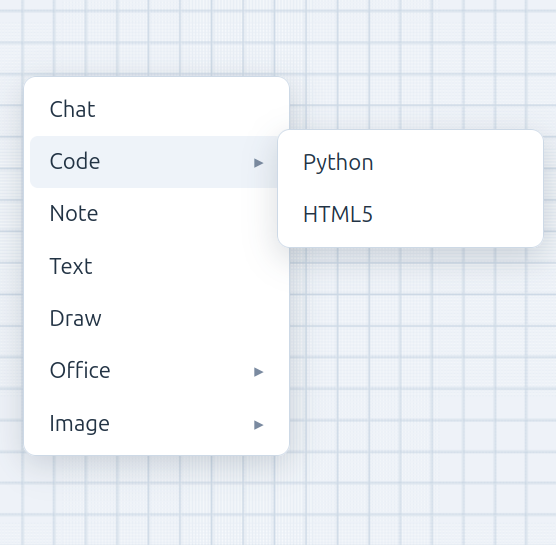
Right-click anywhere on the canvas to open the context menu, then pick what to drop — a chat bubble, a code cell, a note, and more. Whatever you create spawns at the point you clicked. See The canvas for the full menu.